


GasBuddy: Find & Pay for Gas
3.0222.57K Reviews
App Specs
- Version
- 702.4.26636
- Updated On
- License
- Free
- Downloads
- 10,000,000+
- Developer
- PDI Software, Inc.
- Categories
- Travel & Local
- Platform
- Android, iOS
Screenshots

 Analysis by AppCompare
For a first-time user, the useful question is not just where gas is cheapest; it is whether you can find a nearby station and decide if a small detour is worthwhile before you need to refuel urgently. GasBuddy: Find & Pay for Gas is built around that practical choice. I’d treat it as a companion for comparing stations and planning fuel stops, rather than as a replacement for every navigation or payment app I use.
What to expect before you start
This is a free travel and local app from PDI Software, Inc., with optional in-app purchases listed from $4.99 to $9.99 per item. It is rated for Everyone, and its current version is 702.2.26371, with Android 8.0 as the minimum operating system. GasBuddy has been available since August 27, 2010; its 3.1 average across around 823,000 ratings suggests a mixed experience, despite more than 10 million installs. I’d read that combination as a reason to try it for a specific task and judge how well its local information serves your area, not as a guarantee that every listing will suit you.
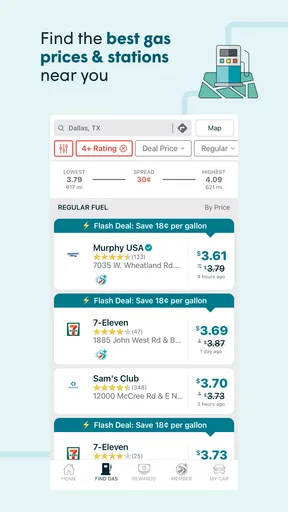
Its central appeal is the chance to compare fuel locations and reported prices, with a payment option intended to make filling up more convenient. The important detail for a newcomer is that price information comes from a community, so usefulness depends partly on other drivers contributing current reports. That makes it especially worth checking when you have enough fuel to compare options, rather than waiting until the tank is nearly empty and choosing under pressure.
Getting ready for your first search
When you open the app, start with a simple goal: find a station near where you already are or near the route you expect to take. Look at the map and compare the nearby options before setting off. You do not need to turn every trip into a detailed fuel audit; even checking a couple of plausible stops can help you decide whether a cheaper station is convenient enough to be worth the turn.
If the first screen asks you to complete setup, keep it focused on that task. Give the app the information or access it requests only when it helps you locate nearby stations or use a feature you actually want. I would begin with station discovery, then explore payment or other extras separately. That way, you can tell whether the basic locator is useful in your neighborhood before spending time configuring more of the app.
Your first useful result
A good first test is a familiar errand: check nearby stations before leaving home, pick one that is both reasonably priced and easy to reach, then see whether the reported price matches what you encounter. This tells you more than browsing a map in the abstract. If the information looks stale or a station is inconvenient, try another listing and contribute a correction if the app gives you that option. Community reports work best when drivers treat them as shared guidance, not as an unquestionable live feed.
For a longer drive, the trip cost calculator can offer a rough fuel-cost estimate after you enter the start and end points. I find that most useful for comparing the general cost of two travel plans, not for budgeting to the last cent: actual fuel use and prices can vary. It can still make a road trip feel less guesswork-heavy, especially when you want to set aside a sensible amount for fuel before you leave.
Worth Reading Before You Choose

Flipboard Shows What News Apps Must Do Beyond the Feed

Switching to Android Auto Means Rethinking Your Driving Routine

Google Calendar Makes a Crowded Week Easier to Manage

Ludo King Makes the Most of the Minutes Between Plans

Baby Panda World Brings Quick Play to Modern Phones, but Its Game Library Feels Busy

ESPN’s Live Game View Makes Following Close Games Easier
The Ultimate Gas Station Companion
So, what's the deal with GasBuddy? Well, this app is like having a pocket-sized gas station guru that not only helps you find the closest fuel options but also snags you the best prices. Imagine bypassing the crazy expensive stations and heading straight to the ones that won't make you wince at the pump. That's the magic here.
Features That Make a Difference
When I first fired up the app, I was greeted with a clean and user-friendly interface. It’s refreshing to see an app that doesn’t try to overcomplicate things. GasBuddy offers a map view that pinpoints nearby gas stations, complete with prices updated by users in real-time. Yep, it’s crowd-sourced, so you’re getting the latest info from fellow drivers just like yourself.
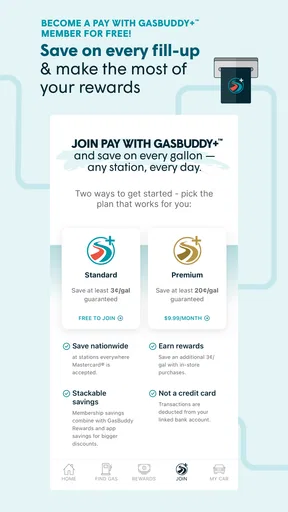
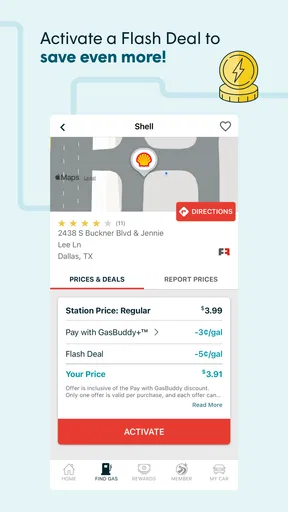
One of the standout features is the ability to pay for your gas directly through the app. This isn’t just a convenience thing; you actually get discounts for using their payment system. I mean, who doesn’t love saving a few bucks while fueling up?
Community and Rewards
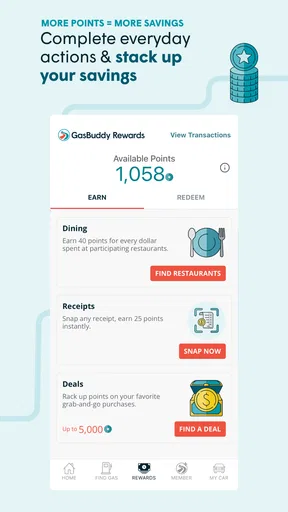
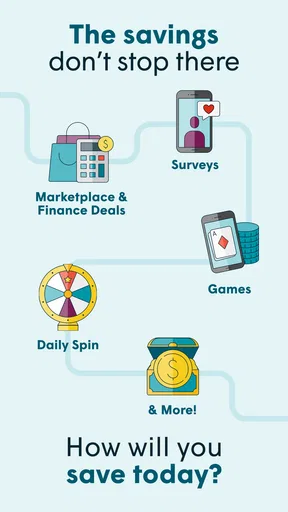
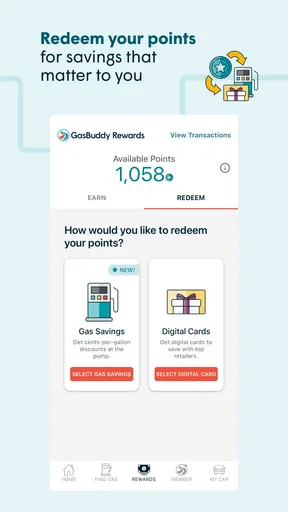
GasBuddy goes beyond just being a gas station locator. It creates a sense of community among its users. You can report prices, helping others find the cheapest gas around. Plus, there are points and rewards for participating, which can be redeemed for discounts. It’s like a little game that benefits your budget.
And let’s not forget about the trip cost calculator. This feature allows you to estimate how much your journey will cost in fuel, which is super handy for those of us who like to plan every detail of our road trips. Just plug in your start and end points, and voilà, you’ve got a rough estimate of your gas expenses.
Personal Experience
After a few weeks with the app, I found myself relying on it more often than I expected. It’s incredibly satisfying to know you’re not overpaying for gas, especially when prices seem to fluctuate wildly. The app’s real-time updates were surprisingly accurate, with only a few minor discrepancies that were quickly corrected by other users.
The payment feature was a game-changer for me. It was simple to set up, and the discounts made it worth using. I felt a little like a savvy traveler as I breezed through the payment process, saving both time and money.
Reading prices with a practical eye
A reported price is a useful lead, not a promise that the pump will show exactly the same amount when you arrive. Before making a special trip, compare the potential saving with the extra distance and time. A station a little farther away may not be the better choice if the detour costs more in fuel or disrupts your plans. I’d use the map to narrow the options, then let convenience, route and the posted price together guide the decision.
There’s also a useful habit for areas where reports are uneven: check again closer to the time you plan to stop, and avoid building a long route around a single unusually low listing. When you are already at a station, reporting a corrected price can make the next driver’s search more dependable. That small contribution is more valuable than repeatedly refreshing the map and assuming every change reflects a verified pump update.
A realistic stop on an ordinary day
Imagine you are heading home after work and notice you will need fuel before the next morning. Instead of waiting until the commute is urgent, open the map while parked, compare stations near home and along your usual route, and choose a stop that does not send you across town for a marginal difference. If the displayed price is promising, you can check it when you arrive and decide whether to report a mismatch. The useful win is not always finding the absolute lowest number; it is avoiding an unnecessary premium without turning an errand into a detour.
For a road trip, I’d use the app in two passes. First, use the calculator to get a broad sense of fuel cost between the start and destination. Later, when planning an actual stop, check the map near the route rather than treating the estimate as a fuel itinerary. This keeps the calculator in its proper role: a planning aid, not a guarantee of what the journey will cost or where you must fill up.
When the payment option makes sense
Paying through the app can be worthwhile if you prefer handling a fuel transaction on your phone and the station and payment setup work for your situation. I would check the terms shown during setup and compare the benefit with the payment method you already use. A discount is only useful if the process is convenient and the station you choose accepts the option as expected. If you would rather pay directly at the pump or inside, the locator and community features can still be the reason to keep the app.
That distinction matters for first-time users: you do not have to make every feature part of your routine. Try finding a station first, then decide whether the payment route or rewards are worth learning. Optional purchases are listed within the app, but the basic download is free; I would avoid paying for anything until you understand what it adds to the particular way you refuel.
Where it fits beside other travel tools
Compared with a general navigation app, GasBuddy is more focused on fuel prices and station reports than on guiding an entire journey. A maps app may be the better choice when you mainly need turn-by-turn directions, traffic context or a broad destination search. GasBuddy is more useful when comparing the fuel stop itself is the decision you want help with. I would use the two for different jobs rather than expecting one to replace the other.
Compared with simply choosing the nearest station from the road, the app adds a way to weigh reported prices and community input before you stop. That advantage is strongest when there are several reasonable options and you have time to compare. If you are low on fuel, driving somewhere unfamiliar, or dealing with a route where stopping choices are limited, safety and reachability should come before chasing a lower displayed price.
Common points that can trip up a new user
The map can show a station and a reported price, but that does not mean every listing will be equally current or convenient. Crowd-sourced information is inherently uneven: one area may have active contributors while another has fewer recent reports. I would compare several nearby entries when possible, treat an outlier cautiously, and avoid assuming that a low report is still accurate simply because it appears on screen.
Another likely source of confusion is the difference between an estimate and a final cost. The trip calculator gives a rough view of fuel expense; your vehicle, route and actual pump prices affect what you spend. Likewise, a discount tied to in-app payment should be judged by the terms and steps shown when you set it up, not by assuming every purchase or every station works identically.
The app’s average rating of 3.1 is a sensible reminder to keep expectations practical. A mixed rating does not tell me whether a particular station report near my home will be helpful, but it does argue against treating the experience as flawless. If the map or payment flow is inconvenient for you, it is reasonable to use another tool for that task instead of forcing GasBuddy into every fill-up.
Who will get the most from it
I think it is a good fit for drivers who often pass several stations, care about price differences, and are willing to glance at community reports before choosing. Regular commuters can build a simple habit around checking before a planned fill-up, while road-trippers may appreciate having a rough fuel budget and a way to compare stops. People who enjoy contributing useful local information may also find the reporting and rewards element engaging.
It is less compelling for someone who always uses one familiar station, rarely compares prices, or wants a single app to handle full-route navigation and every aspect of travel planning. It may also be the wrong choice if you dislike crowd-sourced listings or do not want to set up an app-based payment method. In those cases, a standard maps app or your preferred payment method may be simpler, even if you give up GasBuddy’s fuel-focused comparison.
Making the next stop more useful
After your first search, keep the routine light: check before a planned stop, compare practical alternatives, and note whether reports in your area tend to match what you see at the pump. If you find a discrepancy, a correction helps other users; if the app’s prices are consistently useful nearby, you can make it part of your regular pre-fuel check. There is no need to consult it on every drive or chase every small difference.
My main advice is to separate three decisions: where a station is, whether its reported price is credible enough to consider, and whether paying through the app is convenient for you. Keeping those questions distinct makes the experience clearer and avoids confusing a useful map result with a guaranteed saving. The best outcome is a stop that fits your route and budget, not simply the lowest number on the screen.
Final Thoughts
In a world where every penny counts, GasBuddy: Find & Pay for Gas is a must-have app for any driver. It’s not just about finding cheap gas; it’s about making smarter choices with your fuel. The app’s community aspect adds a social layer that makes it more engaging than your average navigation tool.
If you’re like me and want to keep your travel costs down while ensuring you never run out of gas, give GasBuddy a spin. You might just find that it becomes one of those indispensable apps you can’t imagine driving without. Happy fueling!
Pros
- Saves money with real-time gas price updates.
- Features a user-friendly interface for easy navigation.
- Offers rewards for reporting gas prices.
- Integrates with maps for quick station directions.
- Provides fuel price history for budgeting.
Cons
- Requires location services
- affecting battery life.
- Ad-supported
- which may disrupt user experience.
- Limited features in rural areas with fewer stations.
- Occasional inaccuracies in reported prices.
- Account setup needed for payment features.
FAQs for GasBuddy: Find & Pay for Gas
What is GasBuddy and how does it work?
GasBuddy is an app designed to help users find the cheapest gas prices in their area. By utilizing user-reported data, it offers a comprehensive overview of local gas stations and their current prices. Additionally, the app provides features like GasBuddy Pay, which allows users to pay for gas directly through the app for added convenience.
Is GasBuddy free to use, and are there any in-app purchases?
Yes, GasBuddy is free to download and use. However, it offers optional in-app purchases and subscriptions, such as GasBuddy Plus, which provides benefits like roadside assistance and increased savings on gas purchases. The basic features like finding gas prices and stations remain free for all users.
How reliable is the price information on GasBuddy?
GasBuddy relies on user-reported data, which means prices are updated frequently by other app users. While this generally ensures up-to-date information, there can be occasional discrepancies. The app encourages users to report prices accurately to maintain reliability and offers incentives like points and rewards for doing so.
What is the GasBuddy Pay feature, and is it secure?
GasBuddy Pay is a feature that allows users to pay for gas directly through the app, often at a discounted rate. It links to your checking account to process payments. GasBuddy ensures the security of transactions by using encryption and other security protocols to protect user data, making it a convenient and safe option for many users.
Can GasBuddy be used internationally?
While GasBuddy primarily focuses on the United States and Canada, its functionality might be limited in other countries. Users traveling internationally may find the app less useful due to fewer user-reported prices. It's advisable to check the app's coverage in the specific region you plan to visit before relying on it for international travel.


